
Step 1: Design the form
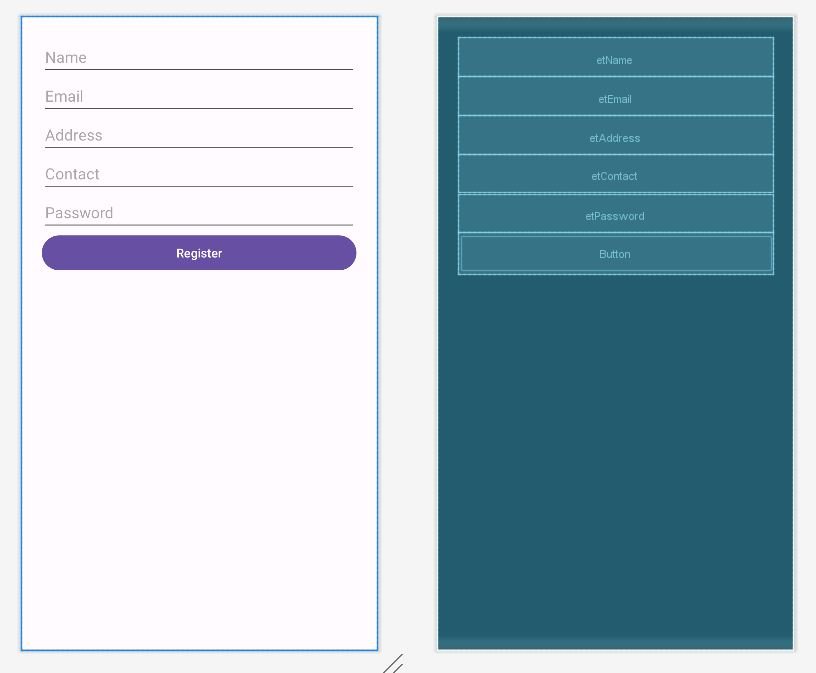
<LinearLayout xmlns:android="http://schemas.android.com/apk/res/android"
    android:orientation="vertical"
    android:padding="24dp"
    android:layout_width="match_parent"
    android:layout_height="match_parent">

    <EditText android:id="@+id/etName"
        android:hint="Name"
        android:layout_width="match_parent"
        android:layout_height="wrap_content"/>

    <EditText android:id="@+id/etEmail"
        android:hint="Email"
        android:layout_width="match_parent"
        android:layout_height="wrap_content"/>

    <EditText android:id="@+id/etAddress"
        android:hint="Address"
        android:layout_width="match_parent"
        android:layout_height="wrap_content"/>

    <EditText android:id="@+id/etContact"
        android:hint="Contact"
        android:layout_width="match_parent"
        android:layout_height="wrap_content"/>

    <EditText android:id="@+id/etPassword"
        android:hint="Password"
        android:inputType="textPassword"
        android:layout_width="match_parent"
        android:layout_height="wrap_content"/>

    <Button
        android:id="@+id/btnRegister"
        android:text="Register"
        android:layout_width="match_parent"
        android:layout_height="wrap_content"/>
</LinearLayout>
Step 2: Create a java helper class
import android.content.ContentValues;
import android.content.Context;
import android.database.sqlite.SQLiteDatabase;
import android.database.sqlite.SQLiteOpenHelper;

public class DBHelper extends SQLiteOpenHelper {

    public static final String DB_NAME = "UserDB.db";

    public DBHelper(Context context) {
        super(context, DB_NAME, null, 1);
    }

    @Override
    public void onCreate(SQLiteDatabase db) {
        db.execSQL("CREATE TABLE users(" +
                "email TEXT PRIMARY KEY," +
                "name TEXT," +
                "address TEXT," +
                "contact TEXT," +
                "password TEXT)");
        // Insert dummy data
        db.execSQL("INSERT INTO users (email, name, address, contact, password) VALUES ('dummy@example.com', 'John Doe', '123 Main St, Springfield', '123-456-7890', 'password123')");
    }

    @Override
    public void onUpgrade(SQLiteDatabase db, int oldVersion, int newVersion) {
        db.execSQL("DROP TABLE IF EXISTS users");
        onCreate(db);
    }

    // Insert user
    public boolean insertUser(String email, String name, String address, String contact, String password) {
        SQLiteDatabase db = this.getWritableDatabase();
        ContentValues values = new ContentValues();
        values.put("email", email);
        values.put("name", name);
        values.put("address", address);
        values.put("contact", contact);
        values.put("password", password);

        long result = db.insert("users", null, values);
        return result != -1;
    }
}
Step 3: Java code
import androidx.appcompat.app.AppCompatActivity;

import android.database.Cursor;
import android.database.sqlite.SQLiteDatabase;
import android.os.Bundle;
import android.util.Log;
import android.view.View;
import android.widget.Button;
import android.widget.EditText;
import android.widget.Toast;

public class MainActivity extends AppCompatActivity {

    EditText etName, etEmail, etAddress, etContact, etPassword;
    Button btnRegister;
    DBHelper db;
    @Override
    protected void onCreate(Bundle savedInstanceState) {
        super.onCreate(savedInstanceState);
        setContentView(R.layout.activity_main);

        db = new DBHelper(this);

        etName = findViewById(R.id.etName);
        etEmail = findViewById(R.id.etEmail);
        etAddress = findViewById(R.id.etAddress);
        etContact = findViewById(R.id.etContact);
        etPassword = findViewById(R.id.etPassword);
        btnRegister = findViewById(R.id.btnRegister);

        btnRegister.setOnClickListener(new View.OnClickListener() {
            @Override
            public void onClick(View view) {
                boolean inserted = db.insertUser(
                        etEmail.getText().toString(),
                        etName.getText().toString(),
                        etAddress.getText().toString(),
                        etContact.getText().toString(),
                        etPassword.getText().toString()
                );

                if (inserted)
                    Toast.makeText(MainActivity.this, "Registration Successful", Toast.LENGTH_SHORT).show();
                else
                    Toast.makeText(MainActivity.this, "Email already exists", Toast.LENGTH_SHORT).show();
            }
        });

        DBHelper dbHelper = new DBHelper(this);
        SQLiteDatabase db = dbHelper.getReadableDatabase();
        Cursor cursor = db.query("users", null, null, null, null, null, null);

        String[] columnNames = cursor.getColumnNames();
        for (String columnName : columnNames) {
            Log.d("Cursor Column", columnName); // Print all column names for debugging
        }

        if (cursor.moveToFirst()) {
            do {
                // Get the column indices for both "email" and "name"
                int emailColumnIndex = cursor.getColumnIndex("email"); // Add email column
                int nameColumnIndex = cursor.getColumnIndex("name");

                // Check if the columns exist before accessing them
                if (emailColumnIndex != -1 && nameColumnIndex != -1) {
                    // Retrieve the values from the columns
                    String email = cursor.getString(emailColumnIndex); // Email column
                    String name = cursor.getString(nameColumnIndex); // Name column

                    // Log the results
                    Log.d("SQLite Data",   " Email: " + email + " Name: " + name);
                } else {
                    Log.d("SQLite Data", "One or more columns not found in the cursor.");
                }

            } while (cursor.moveToNext());
        }

        cursor.close();
    }
}